

Introduction
The customer wants a walnut conference table with a larger tabletop and built-in power outlets. The sales team can offer these choices, but can the manufacturer produce them exactly? Does the quote include all additional charges?
When product details, pricing, and manufacturing restrictions are stored in different places, these questions become more difficult.
CPQ systems can bring this information together, but their accuracy depends on how the underlying data is organized. Automating the quoting process will not solve confusion if the relationships between products, options, rules, and prices are unclear.
For product owners, architects, and IT teams, understanding how these pieces work is the first step. It begins with the purpose of the data model.
What is a furniture CPQ data model?
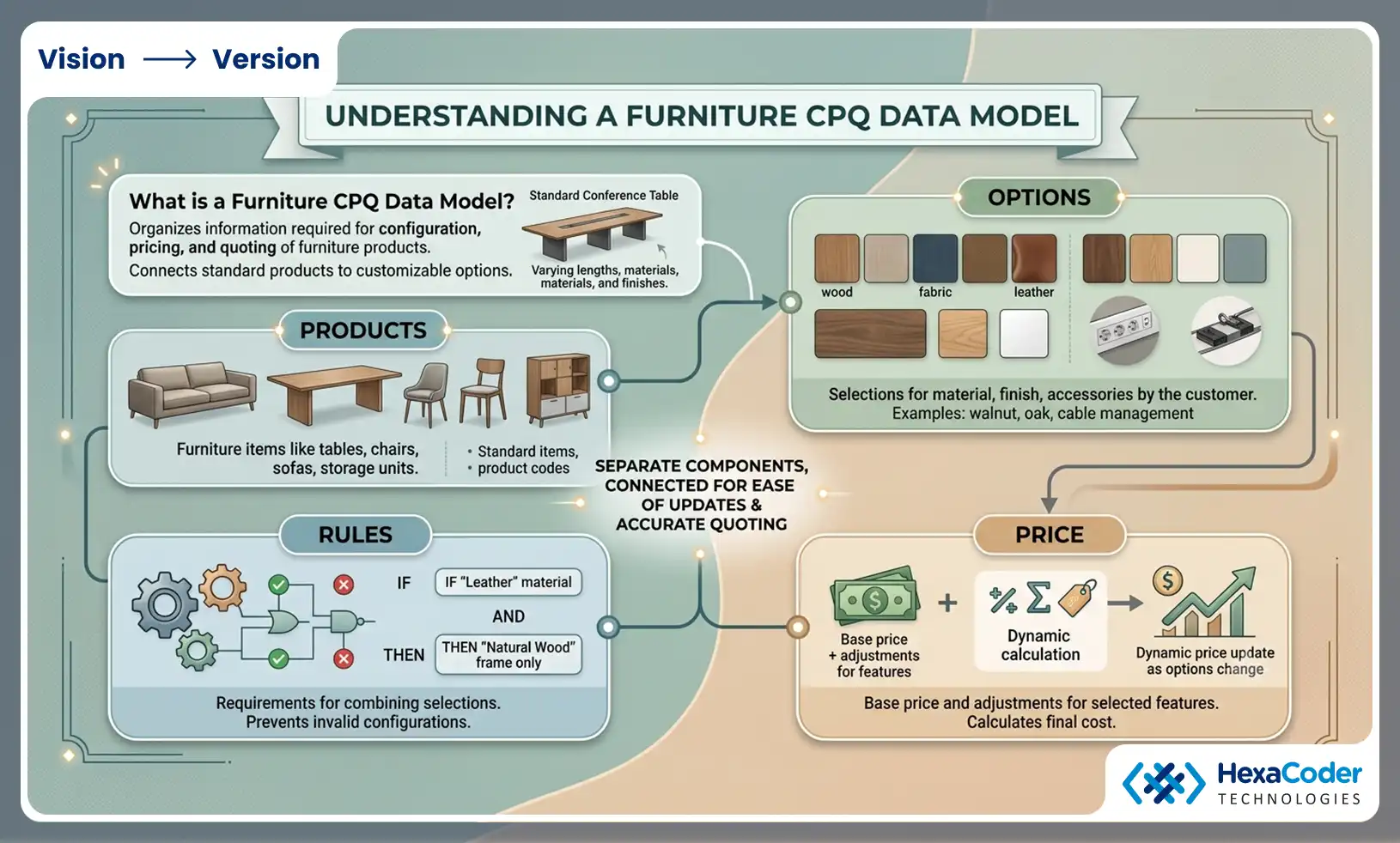
A furniture CPQ data model organizes the information that a Configure, Price, Quote (CPQ) system requires to identify furniture products, offer choices, and calculate prices.
Instead of storing every variation separately, the model connects a standard product with the options that customers can choose from.
As an example, a conference table may come in a variety of lengths, materials, and finishes. As a result, the model identifies those choices, determines which combinations are permissible, and connects those choices to the appropriate pricing information.
Understand the four main parts of a furniture CPQ data model
The furniture CPQ system typically uses four types of information:
Products: Furniture items like tables, chairs, sofas, and storage units.
Options: Material, finish, and accessory selections by the customer.
Rules: Requirements for combining selections.
Price: The base price and adjustments associated with selected features.
Each part serves a different purpose. There is the option of a walnut finish. The restriction that prevents that finish from being applied to a particular material is called a rule. The additional charge is part of the pricing.
It is easier to update these details when they are kept separate but connected. It is, however, essential that products and their available choices have a consistent structure before they can work.
How should furniture products and options be organized?
Furniture products should be categorized into families and models, with each model corresponding to its available options. As a result, teams have access to consistent product information without having to create separate catalog entries for each variation.
Group related furniture products
The concept of product families refers to groups of similar products, such as conference tables, dining tables, office chairs, and storage units.
Manufacturers can maintain individual models within each family with their own designs and features.
As an example, a conference table family might include three models with different bases and tabletops.
Identifying a product, providing a description, and determining availability are all needed for each model. The details describe what is being sold, while options describe what customers can customize.
Maintain consistent product option data
The product option data describes the choices and values customers can select for a furniture product.
Examples include:
The length, width, and height of something.
A variety of materials can be used, such as oak, walnut, steel, or fabric.
Surface treatments, finishes, and colors.
Power modules, cable trays, and drawers are accessories.
There are five table models available in walnut finishes.
Every model stores the finish under a different name, making updating its availability and price difficult.
The use of one consistent option definition across multiple products helps teams maintain consistency.
Connect options to the right models
Every product does not have every option.
It is possible for a chair to be upholstered in leather, whereas another model may only be available in fabric. It may be necessary to use a different construction method for a larger tabletop.
Instead of displaying every option for each model, the catalog should identify which options are available.
As a result, customers can choose from a variety of options. The next step is to determine whether those selections can be combined.
How does a CPQ rules model prevent incorrect configurations?
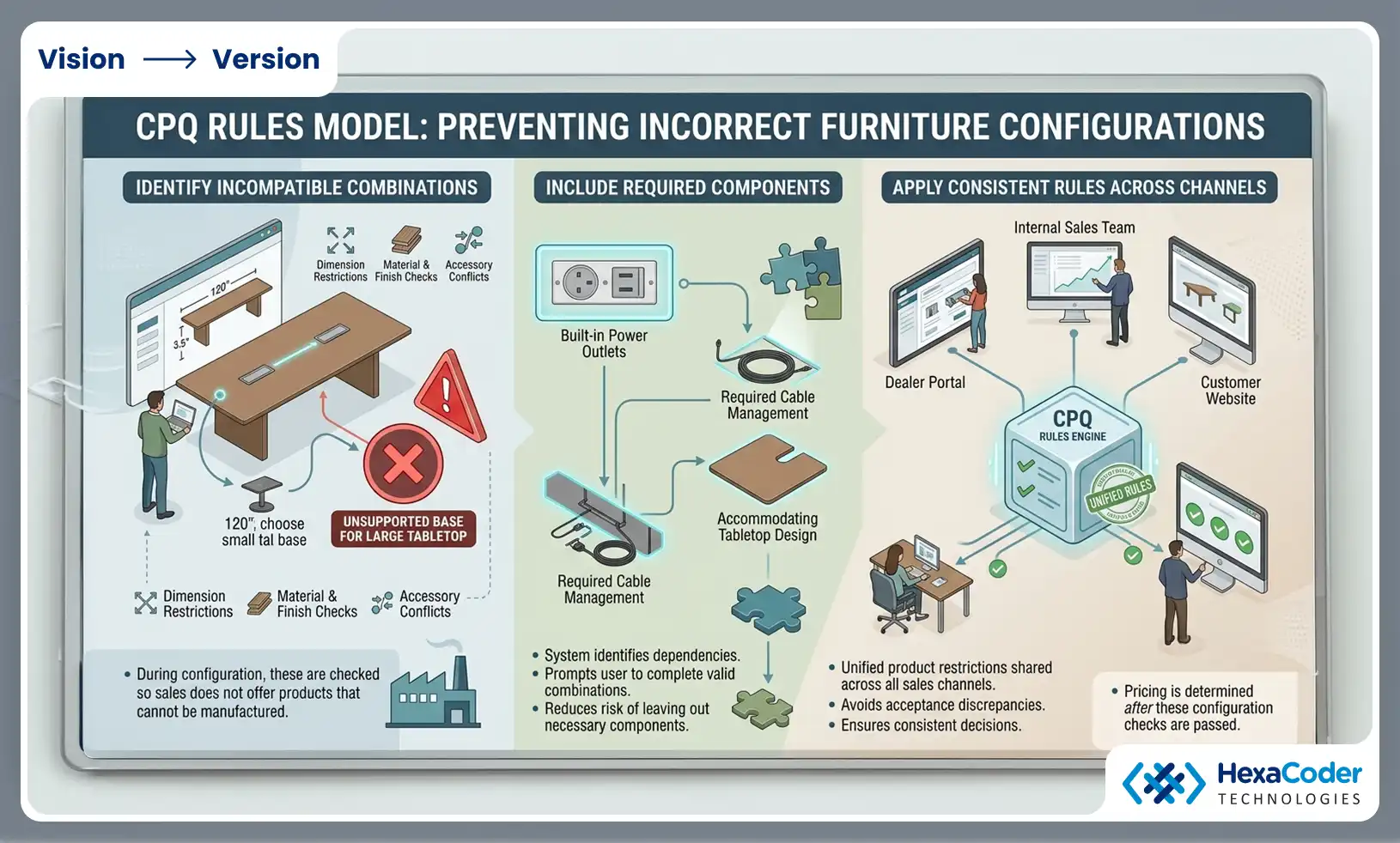
A CPQ rules model checks selected options against predefined product restrictions in order to prevent incorrect furniture configurations. Additionally, it helps users identify required components and complete valid combinations.
As a result of these rules, product decisions are consistent across all sales channels.
Identify incompatible combinations
Assume a customer selects 120-inch conference tables with smaller tabletops but chooses a base made for smaller tabletops.
This combination should be recognized as unsupported by the system.
Material, finish, accessory, and manufacturing dimension restrictions may also apply.
During configuration, these conditions are checked so the sales team does not offer products that cannot be manufactured.
Include required components
Some choices depend on additional factors.
Choosing built-in power outlets, for instance, may require cable management or a tabletop design that accommodates power outlets.
In order to complete the configuration, the system can identify those requirements and ask the user to complete them.
As a result, the risk of leaving out necessary components is reduced.
Apply the same rules across sales channels
A furniture manufacturer may sell through a dealer portal, through an internal sales team, and through a customer-facing website.
The same configuration should not be accepted in one channel and rejected in another merely because different rules are being applied.
Maintaining consistency is easier when product restrictions are shared.
After a configuration has passed these checks, the system must determine its selling price.
How should furniture pricing connect to product options?
Furniture pricing should consider options, quantities, and customer agreements when adjusting a product's starting price. As a result, the quote will be based on the actual configuration rather than just an estimate.
Start with a base price
A base price represents a product's standard version. The relevant pricing rules determine the adjustments when customers choose different dimensions, materials, or accessories.
As an illustration, consider the following:
| Product selection | Pricing rule | Amount |
|---|---|---|
| Standard conference table | Base price | $1,500 |
| Larger tabletop | Size adjustment | +$250 |
| Walnut material | Material adjustment | +$300 |
| Premium finish | Finish adjustment | +$125 |
| Built-in power | Accessory adjustment | +$175 |
| Final configured price | Base price + adjustments | $2,350 |
Prices are illustrative only; they are not benchmarks for the industry.
Each selected option is connected to a pricing rule that determines whether an additional charge will be applied. Whenever a customer changes the tabletop size, material, finish, or accessory, the total will be updated based on the relevant pricing information.
In this way, the final quote is connected to the actual product configuration rather than an estimate entered manually.
Include customer and order conditions
Pricing is not solely determined by product options.
There may have been a rate negotiation between the dealer and the manufacturer. An order with a large quantity may be eligible for a quantity adjustment. Additional charges may apply for special handling or freight.
In calculating the quote, these conditions should be considered, not added later through unrelated spreadsheets.
Keep track of pricing changes
The price of a product may change when changes are made to material costs, supplier agreements, or commercial policies.
After a new price list has been implemented, teams should be able to explain the amount using the pricing information for an existing quote.
By connecting pricing to product selections, manufacturers can manage more variations without maintaining separate prices.
Why do furniture manufacturers need a configurable catalog?
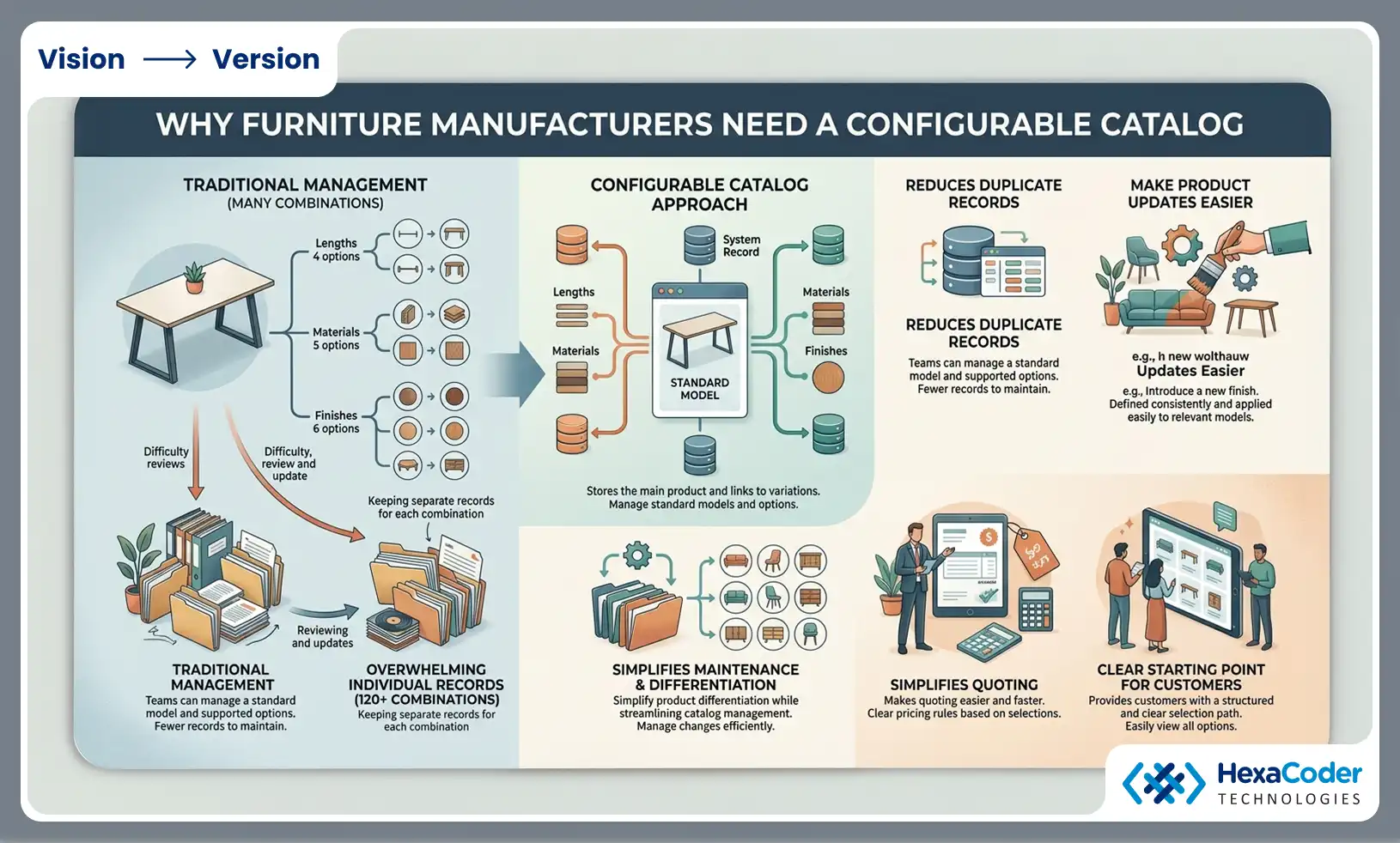
With the help of a configurable catalog, furniture manufacturers can offer multiple product variations while maintaining information about shared products and options.
Teams can manage a standard model and its supported options rather than creating a separate catalog record for each combination.
Reduce duplicate product records
Consider a table that comes in four lengths, five materials, and six finishes.
Before accessories are included, there are 120 possible combinations.
Keeping separate records for each combination means more records to review whenever a material, finish, or product restriction changes.
Configuration-based catalogs store the main product and connect it to the options available.
Make product updates easier
Assume that a manufacturer introduces a new finish across several collections.
The finish can be defined consistently and made available on the appropriate models with shared option information.
Maintaining a catalog in this way simplifies product differentiation while simplifying catalog maintenance.
In addition to providing customers with a clear starting point for their selections, a well-organized catalog makes quoting easier.
How does product information become a furniture quote?
A CPQ system creates a furniture quote by recording the selected product, checking its options, and applying configuration rules.
In this process, catalog information is linked to the specific choices made for an order.
Record customer selections
In the first step, the system captures the product model and selected features.
Customers might choose 96-inch conference tables with walnut material, natural finishes, and one power module, for example.
As a result of these details, we need to check and price the configuration.
Validate and calculate the quote
As a next step, the system checks if the options selected are compatible.
Depending on the configuration, the relevant base price, option adjustments, and commercial terms will be applied.
Before the quote is finalized, the system can identify a problem if the selection is not supported.
Preserve the accepted configuration
The selected product details must remain available for order processing once the quote has been approved by the customer.
A manufacturing team must be aware of the exact dimensions, materials, finishes, and accessories that were approved in advance.
The preservation of this information reduces the likelihood of misunderstandings between sales and production.
CPQ becomes more reliable when information is shared with other business systems.
How should CPQ connect with existing business systems?
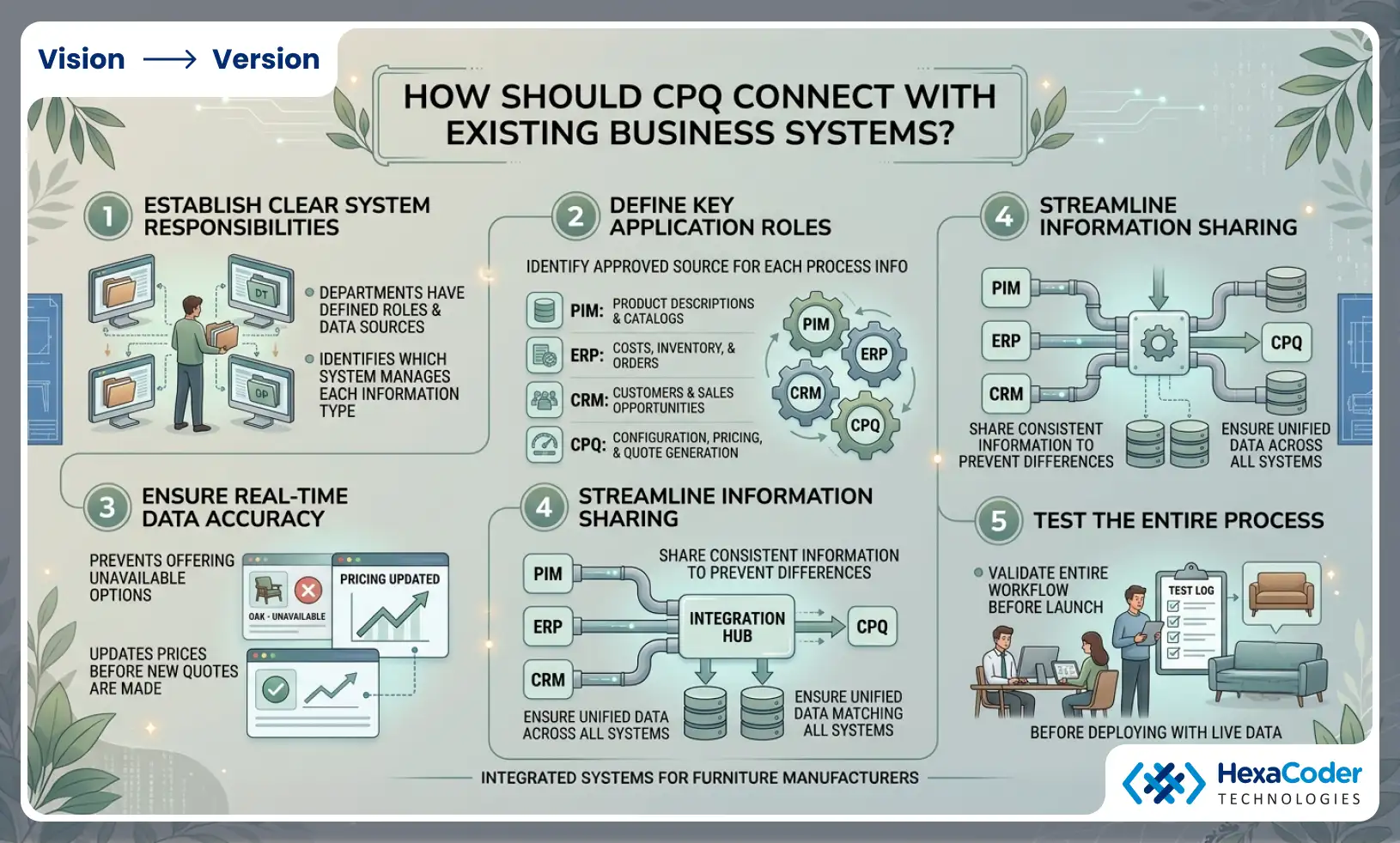
CPQ should exchange information with systems that track product details, costs, and orders. When departments have clear responsibilities, conflicting information is less likely to arise.
Identify which system manages each type of information
Businesses in the furniture industry commonly use the following applications:
PIM: Manages product descriptions and catalogs.
ERP: Keeps track of costs, inventory, and orders.
CRM: Maintains information about customers and sales opportunities.
CPQ: Configuration, pricing, and quote generation.
Depending on the manufacturer's existing system, specific responsibilities may apply.
For each process, it is important to identify which application supplies the approved information.
Keep information updated
The quoting system should not continue to offer a finish if it becomes unavailable because it is based on an older catalog.
In the same way, updated prices should reach the quoting process before new quotes are generated.
It is easier to prevent these differences if information is shared consistently.
Teams should test the entire process before implementing it with actual products and customer requirements.
How can teams prepare a furniture CPQ data model for implementation?
To prepare a CPQ model, teams must review existing product information, define options and restrictions, test pricing scenarios, and involve manufacturers and quoting departments.
It is easier to manage the work if you start with one representative product family.
Review current product information
A collection of models, options, pricing records, and manufacturing restrictions for the selected family should be collected.
Verify that there are no duplicate option names, no charging errors, outdated prices, and no unclear limitations on the product.
Preventing these issues from becoming part of the new quoting process is achieved by resolving them early.
Test real quoting scenarios
Consider examples that sales teams encounter regularly.
For example, you might need to purchase oversized furniture, premium materials, incompatible accessories, or make changes to an existing quote.
Calculate the expected price by checking whether the system accepts valid combinations, rejects invalid ones, and rejects invalid combinations.
Involve the right departments
Product owners are aware of catalog requirements. Sales teams are familiar with common quoting problems. A manufacturing team understands product restrictions, while an IT team is responsible for system integration.
Input from these departments ensures that the model represents the entire process instead of just one department.
With HexaCoder, furniture businesses can connect product configuration and pricing with existing business systems and develop custom CPQ workflows.
Conclusion
The furniture CPQ data model connects product information, customer choices, configuration rules, and pricing so teams can create consistent quotes. It is also easier to maintain catalogs and process orders when there are clear relationships between items. HexaCoder helps furniture manufacturers build CPQ solutions that work with their existing systems and product requirements.
FAQs
What is a furniture CPQ data model?
A furniture CPQ data model organizes furniture products, selectable options, configuration restrictions, and pricing information. It helps a quoting system determine which product combinations are valid and how much they cost. This reduces manual checks and keeps product information consistent throughout the quoting process.
What is product option data in furniture CPQ?
Product option data describes the choices customers can make when configuring furniture, including dimensions, materials, finishes, colors, and accessories. It also identifies the values available for each choice. Consistent option information helps manufacturers reuse product features across models and maintain accurate catalogs.
What is a CPQ rules model?
A CPQ rules model defines the conditions used to check furniture configurations. It can prevent incompatible selections, identify required components, and limit options based on product specifications. For example, a rule may prevent customers from choosing a tabletop size that a selected base cannot support.
How does a configurable catalog help furniture manufacturers?
A configurable catalog allows manufacturers to manage product models and their available options without creating separate records for every possible combination. It reduces repeated information, makes updates easier, and helps ensure customers see only the choices supported by the selected furniture model.
What should teams check before implementing furniture CPQ?
Teams should review product families, available options, configuration restrictions, pricing adjustments, customer agreements, and existing business systems. They should also test real quoting scenarios and confirm that accepted configurations contain the information manufacturing needs to fulfill the order accurately.