

Personalization is no longer a premium extra for a small subset of buyers. It is becoming a baseline expectation in both ecommerce and complex B2B sales, especially when products have configurable materials, sizes, finishes, accessories, or visual outcomes.
- If customers expect personalization, get overwhelmed by too many choices, and need live product configuration, product customization software is usually the right next move.
- McKinsey says 71% of consumers expect personalized interactions and 76% get frustrated when those interactions do not happen, while Accenture reports 74% of consumers walked away from purchases because they felt overwhelmed.
- The clearest signs are manual compatibility checks, static product pages for configurable items, pricing that changes by option, repeated sales back-and-forth, and rising order errors or production corrections.
- Strong product customization software combines rules logic, guided workflows, dynamic pricing, live previews, and integrations with ecommerce, ERP, CAD, or quoting systems.
- If your products need real-time 3D visualization, performance engineering matters as much as UX. Techniques like level-of-detail rendering and adaptive rendering help keep configurators usable across devices.
- Start with one high-friction product line, map the configuration rules and outputs, and reduce decision effort through guided steps rather than offering every choice at once.
The urgency is not just about consumer preference. It is also about operational strain: too many product combinations, too much purchase decision effort, and too many errors when teams rely on spreadsheets, email, or static variant pages to handle custom orders.
What is product customization software and when is it no longer optional?
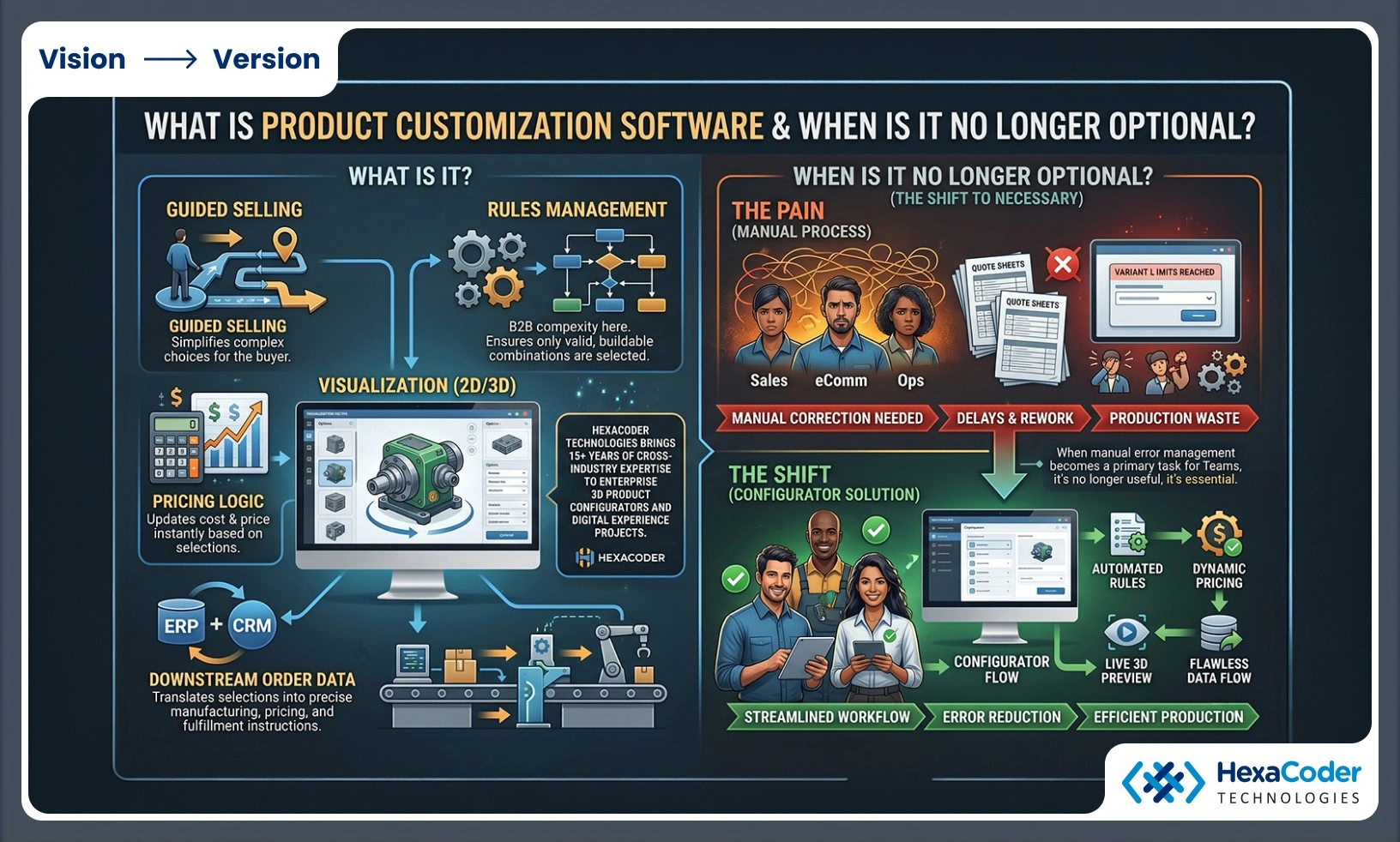
Product customization software becomes necessary when Shopify-style variants or manual quote sheets can no longer handle valid combinations, pricing rules, and live previews. Once sales, ecommerce, and operations teams are correcting orders by hand, the software has moved from useful to necessary.
At its core, product customization software combines guided selling, rules management, pricing logic, visualization, and downstream order data. It sits between the buyer and your production or fulfillment systems, translating selections into something your business can actually make, price, and deliver. If one option changes compatibility, lead time, geometry, or cost, a simple drop-down menu is rarely enough.
A common misconception is that customization software is only for flashy direct-to-consumer products. In practice, it is often more valuable in B2B settings where a misconfigured order can create quoting delays, rework, or production waste.
Why are personalization expectations making manual selling less effective?
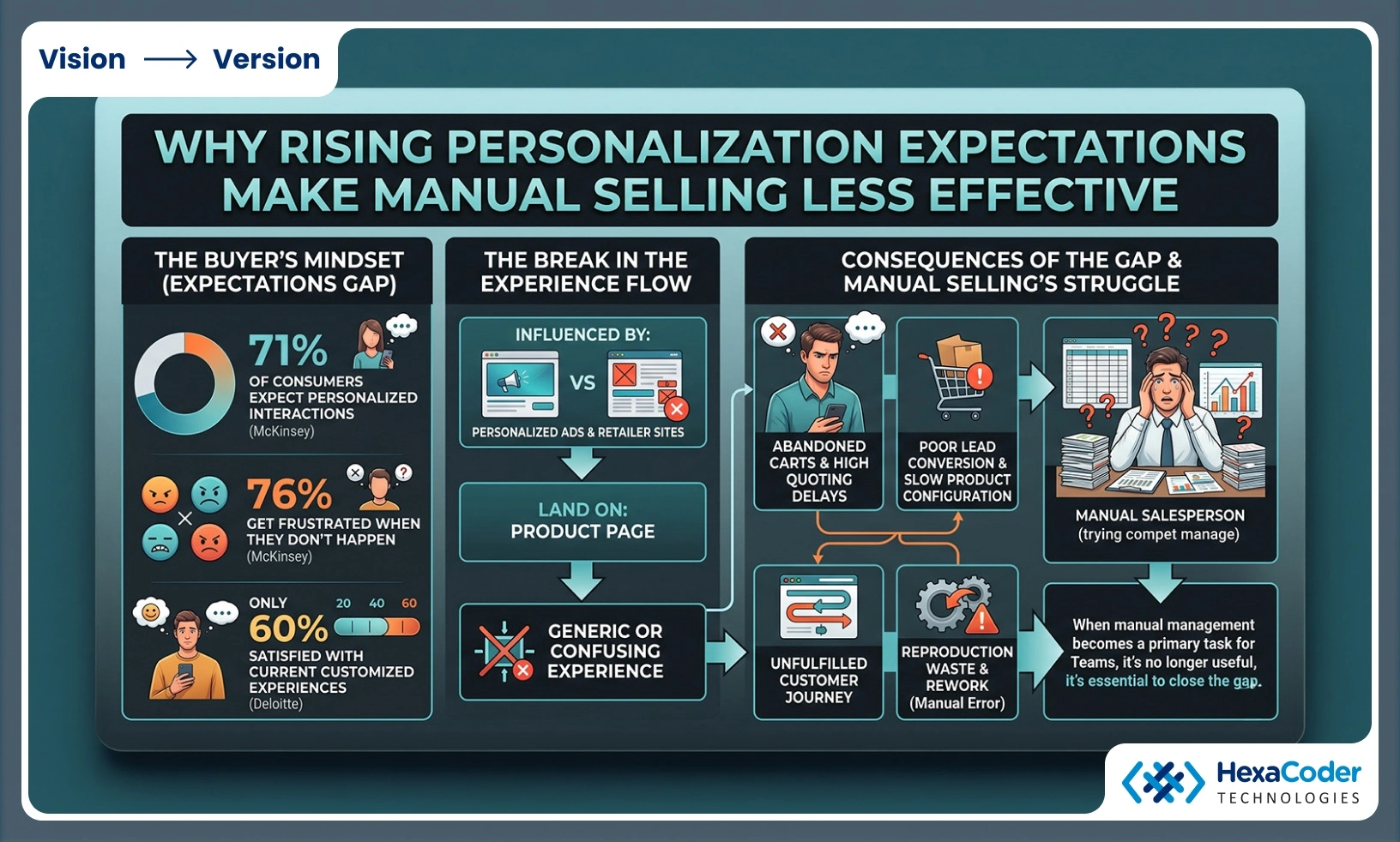
Yes, rising personalization demand is making manual selling less effective. McKinsey and Deloitte both point to a gap between what buyers expect and what many companies actually deliver.
McKinsey reports that 71% of consumers expect personalized interactions, and 76% get frustrated when they do not happen. Deloitte’s 2024 consumer loyalty research found that only 60% of consumers were satisfied with the customized and targeted experiences they currently receive. That gap matters because dissatisfaction does not stay in marketing. It shows up in product pages, configuration flows, sales calls, and abandoned carts.
PwC adds another layer: retailer websites influenced 66% of consumers in its 2024 survey, and seven in ten said personalized social media ads would influence purchase decisions. In other words, the path to purchase is already being shaped by targeted experiences before a buyer even lands on your product page. If the actual product experience feels generic or confusing, the promise breaks.
What are the 7 clear signs your business needs product customization software?
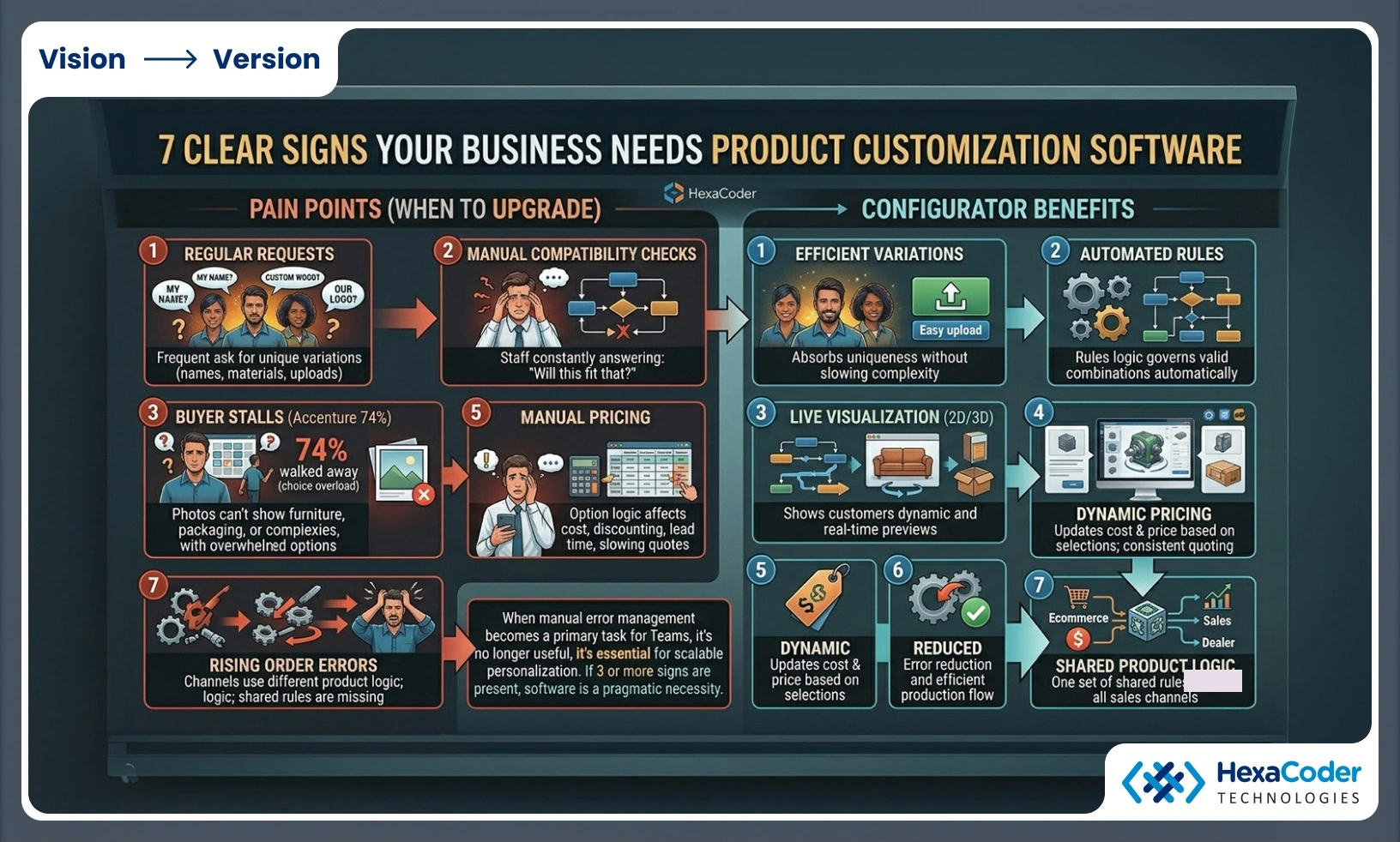
The strongest warning signs appear in both ecommerce storefronts and B2B quote desks. If three or more of the signs below are already present, product customization software is usually a practical response rather than a future nice-to-have.
- Your customers regularly ask for personalized or made-to-order variations. This includes text, names, materials, dimensions, finishes, bundles, or uploaded artwork.
- Your sales or support team manually checks compatibility. If staff members keep answering “Will this part work with that option?” the rules belong in software.
- Buyers stall because there are too many choices. Accenture reports 74% of consumers walked away from purchases because they felt overwhelmed.
- Static photos cannot show what the product will really look like. This is common with furniture, packaging, industrial assemblies, wearables, and outdoor structures.
- Price changes depend on selections. When option logic affects cost, discounting, or lead time, manual pricing creates slow and inconsistent quoting.
- Order errors or production corrections are rising. Every avoidable misconfiguration increases margin leakage.
- Your channels do not present the same product logic. Dealer teams, ecommerce teams, and internal sales often use different rules unless a shared configurator governs them.
The key pattern is not just demand for uniqueness. It is the combination of personalization demand and operational complexity. Shopify notes that around 36% of shoppers prefer customized products, and nearly half will wait for items tailored to them. That willingness to wait helps only if your internal process can absorb the complexity without slowing down everything else.
How can you audit product customization demand in 3 practical steps?
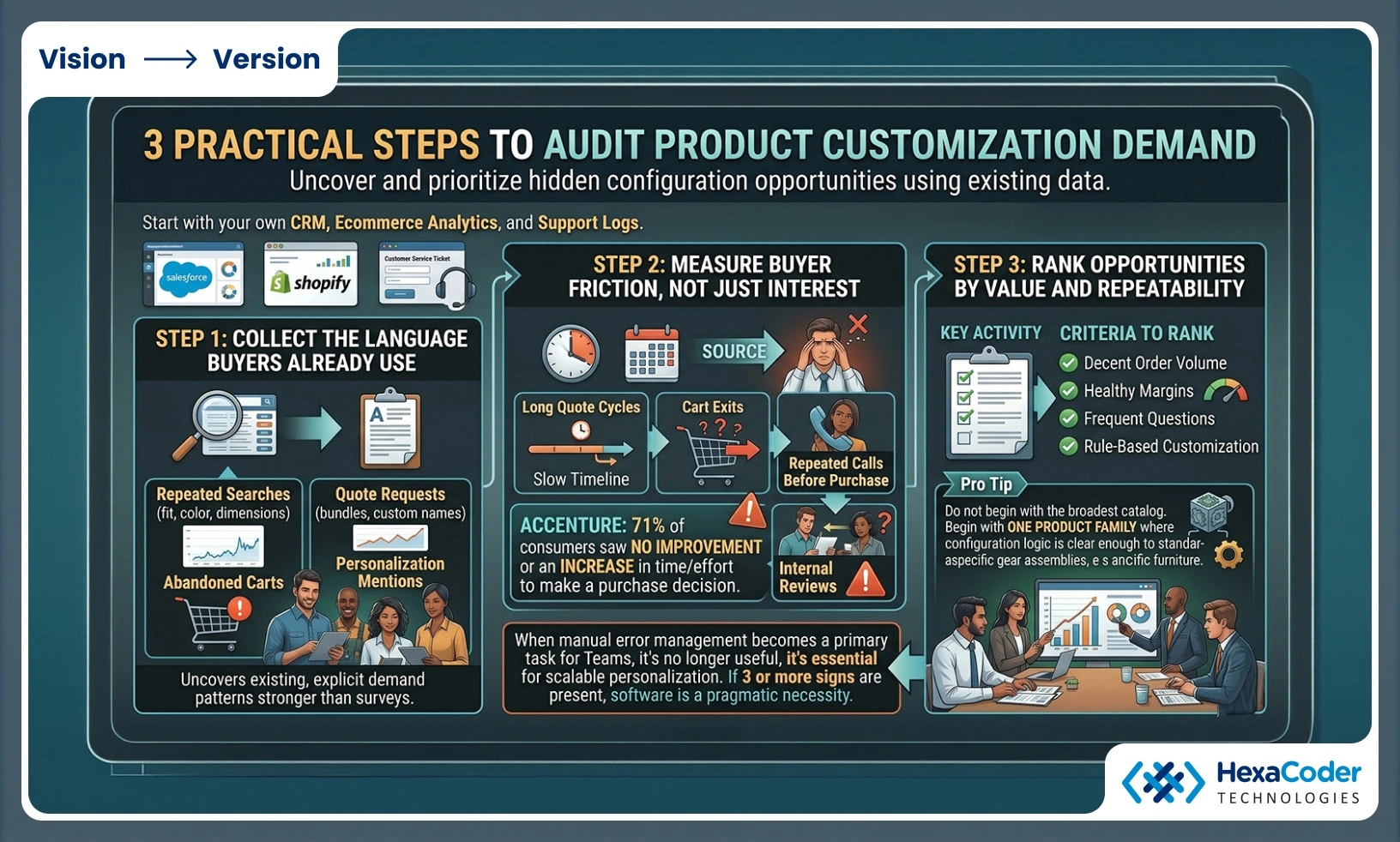
Start with your own CRM, ecommerce analytics, and support logs. Salesforce dashboards, Shopify search data, and customer service tickets usually reveal the demand pattern quickly.
Step 1 is to collect the language buyers already use. Look for repeated searches, quote requests, abandoned carts, and tickets that mention fit, color, dimensions, compatibility, bundles, or personalization. Those requests are often stronger demand signals than broad survey feedback.
Step 2 is to measure friction, not just interest. Track where decision effort increases: long quote cycles, cart exits, repeated calls before purchase, or internal order reviews. Accenture says 71% of consumers saw no improvement, or an increase, in the time and effort required to make a purchase decision. That is a direct clue that your current path is too heavy.
Step 3 is to rank opportunities by value and repeatability. Start with products that combine decent order volume, healthy margins, frequent questions, and rule-based customization. Pro tip: Do not begin with the broadest catalog. Begin with one product family where configuration logic is clear enough to standardize.
How should you map a product customization workflow in 3 steps?
Map the workflow from product data to order output before you compare vendors or build a custom solution. A good workflow map shows how choices affect price, visuals, feasibility, and fulfillment.
Step 1 is to define the configuration model. List every selectable attribute, every dependency, and every exclusion. If finish A only works with material B, or size C requires shipping method D, write that logic explicitly. Hidden tribal knowledge is one of the biggest reasons configurator projects go off track.
Step 2 is to define the outputs. Decide what the software must generate after a buyer configures a product: quote lines, SKUs, BOM data, production instructions, approval records, lead times, or assets for print and packaging.
Step 3 is to design the user path. Decide what the customer sees, what the sales rep sees, and what internal teams need after submission. If the buyer needs guidance, use step-based flows and defaults. If a dealer or engineer needs control, give them an expert mode rather than forcing every user through the same experience.
How do live previews and real-time 3D rendering change software requirements?
They raise the requirement sharply. Three.js and WebGL-style product experiences need asset optimization, rule validation, and device-aware performance, not just a form with swatches.
HexaCoder’s barrel sauna case is a useful example of what happens when product options affect form and visual output at the same time. The configurator had to support wood type, roof color, and lighting customization without hurting real-time 3D rendering performance or model stability. To keep visualization smooth across devices, the solution used level-of-detail rendering, efficient data structures, and adaptive rendering algorithms.
A common mistake is to treat 3D as a visual layer added after the core logic is done. In reality, rendering performance, model structure, and rules logic influence each other. If option changes trigger heavy geometry swaps or large texture loads, the UX can fail even when the business rules are correct. If your buyer needs to judge fit, finish, spatial context, or technical assembly, live previews are often the difference between confidence and hesitation.
What features separate product customization software from simple product options?
Real product customization software includes a rules engine, dynamic pricing, and operational outputs. Basic variant tools work for small choice sets, but they break when dependencies, exclusions, and geometry changes start stacking up.
The difference matters because many teams try to stretch ordinary ecommerce options beyond what they were designed to do. That approach can work for shirts in three colors and four sizes. It rarely works for configurable machinery, packaging, made-to-order furniture, or any product where one choice changes many others.
- Rules engine: Validates allowed combinations and blocks impossible or unsafe selections.
- Dynamic pricing: Updates totals when materials, dimensions, accessories, or service levels change.
- Live visualization: Shows a preview through 2D layers, 3D rendering, or both.
- Operational outputs: Sends clean data to ERP, CRM, PLM, CAD, or production systems.
- Guided UX: Reduces choice overload with defaults, tooltips, step flows, and presets.
If your stack cannot do those things, it is probably a product options tool, not full product customization software.
Is product customization software better than a manual quote-and-approve process?
Usually yes for repeatable complexity. A manual quote process in Salesforce, email, or spreadsheets still makes sense for rare engineer-to-order work, but it becomes expensive when the same rules are checked on every deal.
Here the trade-off is simple. Manual workflows handle edge cases well because humans can interpret nuance. Software handles scale well because it applies the same rules instantly every time. If 80% of your custom orders follow repeatable logic and 20% are special cases, automate the repeatable majority first and keep a review path for exceptions.
A common misconception is that automation must replace expert sellers. In practice, the best systems make experts faster. They remove repetitive validation, produce cleaner quotes, and let the sales team focus on advice, bundling, and relationship-building instead of checking whether option X works with option Y.
How can you reduce choice overload without reducing customization?
Use progressive disclosure, guided selling, and defaults. Accenture’s research on purchase decision effort shows that more options do not automatically produce better buying experiences.
Step 1 is to group choices in a sequence that matches buyer intent. Start with the decisions that shape the product most, then reveal dependent details. Buyers usually handle “size first, finish second, accessories third” better than a screen full of unrelated selectors.
Step 2 is to guide with presets and recommended paths. Show best-selling combinations, industry-specific packages, or “good, better, best” starting points. This is where hyper-personalized experiences can help. Generative AI can suggest relevant paths, but the rules still need to be grounded in real product logic.
Step 3 is to preserve freedom without flooding the interface. Give most users a guided mode and advanced users an expert mode. Pro tip: personalization is not the same as unlimited choice. The stronger model is to offer meaningful choice with guardrails.
What should your product customization software shortlist include?
Your shortlist should include software or partners that can handle rules, UX, integrations, and performance together. For enterprise teams, a nice demo is not enough if the platform cannot survive real product complexity.
Ask vendors or development partners how they handle rule authoring, pricing logic, CAD or ERP data, analytics, and performance testing. If your use case involves real-time visualization, ask how they optimize meshes, textures, and device responsiveness. If your use case is print, packaging, industrial assemblies, or configurable medical products, ask how the system outputs approval-ready or production-ready data.
- Business logic fit: Can the platform model dependencies, exclusions, and approval flows?
- Visualization depth: Does it support 2D, 3D, live previews, or digital twins views where needed?
- System integration: Can it connect with ERP, CRM, ecommerce, CAD, or PIM systems?
- UX controls: Are guided selling, defaults, tooltips, and expert modes available?
- Delivery capability: Can the partner support enterprise rollout, performance tuning, and ongoing iteration?
HexaCoder Technologies is one benchmark in this space because its stated focus spans enterprise-grade 3D product configurators, digital twins, AI/ML, AR/VR, custom web platforms, and UI/UX. Whether you shortlist a specialist firm, a platform vendor, or a hybrid approach, the practical test is the same: ask for a pilot on one high-friction product line and evaluate speed, accuracy, usability, and operational fit.
To continue evaluating configurator options, review our car configurator companies comparison and our 3D product configurator shortlist.